CrossWyers
WindowsElectrical schematic CAD built around Australian electrical work — smart symbols, live device cross-references, terminals, PLC I/O, wire numbering and millimetre-exact drawings from one local project file.
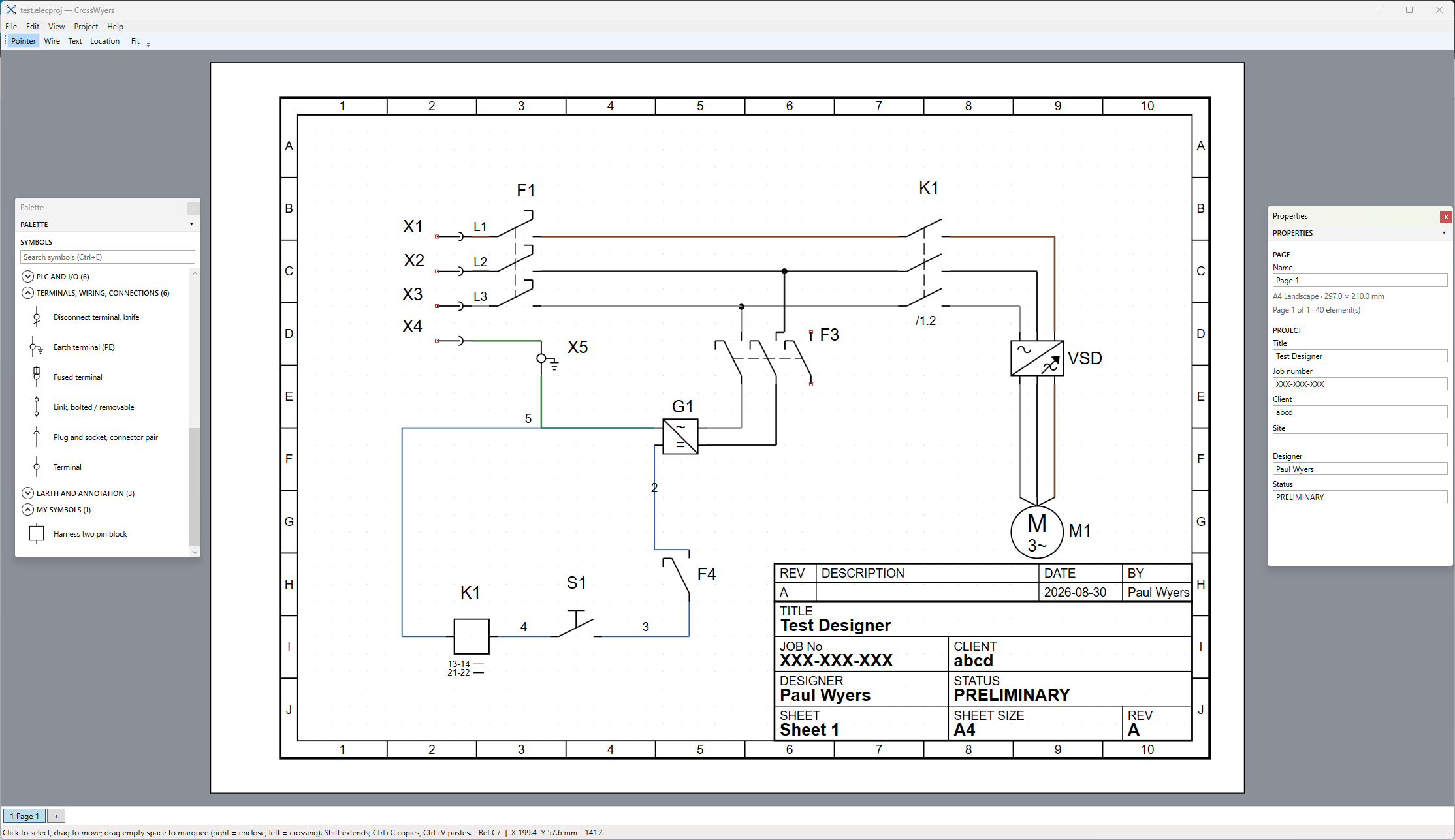
CrossWyers
Electrical CAD without the baggage.
CrossWyers is built specifically around practical electrical schematic work. Draw the circuit once and let the project model handle the relationships between devices, contacts, terminals, PLC channels, wire numbers and schedules.
✓
Australian focused electrical drawing workflow.
✓
Live cross-references that don't go stale.
✓
53 built-in IEC/AS symbols plus your own library.
✓
Single local project file — correct, portable and yours.
✓
PDFs, terminal schedules, device lists and PLC I/O
generated from the same project.
Drawing & editing
- Multi-page schematic editor with millimetre-exact geometry and a free-form canvas.
- A3 and A4 sheets in portrait or landscape with title blocks and editable fields.
- Page tabs and individual Page Setup including editable grid-zone counts and ISO 5457 zone-width advisory.
- Pointer tool with selection, marquee selection, moving and wire-end reattachment.
- Double-click pins, junctions and page arrows to immediately begin wiring.
- Orthogonal wire drawing with automatic junction creation, wire splitting and tees.
- Snapping to grid, pins, junctions, wire vertices and page-link arrows.
- Right-click or Esc cancels the active tool.
- Full labelled undo/redo, copy/paste and device-tag handling when pasting.
- Autosave, Zoom to Fit, 100% zoom and live cursor/zoom status.
Symbols
- 53 built-in IEC/AS electrical symbols including contactors, relays, timers, protection devices, switches, sensors, motors, indicators, transformers, terminals and PLC I/O.
- Searchable symbol palette with user-orderable categories, Favourites, Recent and My Symbols.
- Built-in Symbol Editor with lines, rectangles, circles, fills, line styles, text and validated connection pins.
- Custom symbols saved to
Documents\CrossWyers\Symbols. - Drag individual tag, description and address labels wherever they make sense on the drawing.
- Per-label font sizing and position survive symbol re-embeds.
- Symbols are embedded inside the project so drawings display correctly on another computer.
Devices & cross-references
- Automatic device tagging using IEC letter conventions with Australian house styles.
- Zero-configuration coil ↔ contact cross-references.
- References are calculated live from project geometry rather than stored as static text.
- Cross-references therefore never become stale after moving or editing a device.
- Type an existing device tag onto a contact and CrossWyers automatically links it to that device.
- F12 refresh available whenever required.
Wiring & wire types
- Per-project wire type sets.
- Installation — harmonised: brown / black / grey.
- Installation — legacy AS/NZS: red / white / blue.
- Equipment/panel wiring using IEC 60204-style conventions.
- Individual wire overrides for colour, cross-section, line weight and line style.
- Automatic net-based wire numbering with a plan-and-preview step before applying changes.
- Wire numbers are stored on the actual wire like real enclosure labels.
- Page-link arrows join electrical nets across multiple pages and display paired references.
Terminal strips
- Terminal strips are first-class project objects with their own strip editor.
- Terminal symbols bind directly to strip terminals.
- Link symbols lock onto terminals.
- Multi-level 2-tier and 3-tier terminal blocks with dotted numbering such as 5.1, 5.2 and 5.3.
- Jumpers and bridges genuinely union electrical nets.
- A bridged terminal group represents one potential and receives one wire number.
- Terminal renumbering with preview before applying.
- Generate a physical terminal plan including bridge bars, terminal types and legend.
- Generate terminal schedule outputs directly from the project.
PLC configurator
- Create modular PLC racks and expand them as the design grows.
- Address changes use a plan-and-preview workflow.
- Editable address patterns for different PLC manufacturers.
- Configurable module tables and address formats such as
%I0.5. - Rack overview graphic with a channel mirror.
- Individual descriptions for each PLC channel.
Project checking
- Around 21 advisory project checks.
- Duplicate device tags and PLC addresses.
- Coils without contacts and orphaned contacts.
- Dangling wire ends and unconnected pins.
- Unpaired page links.
- Duplicate or double-bound terminals.
- Elements outside the drawing area and page-number gaps.
- Missing symbols, unknown/default wire types and ghost devices.
- Over-allocated PLC slots and wire/pin mismatches.
- Checks warn you without blocking your work.
Revisions
- Project revision history containing revision code, date, description and author.
- Current revision automatically appears in the title block REV cell.
- The newest four project revisions can be shown directly on the drawing.
- Automatic suggested revision codes including A → B and Z → AA.
Output
- Millimetre-exact colour PDF export of the complete project.
- PDF with Schedules adds a device schedule, terminal schedule and terminal-plan appendix.
- CSV terminal schedule export.
- CSV device list export.
- CSV device-contact export.
- Device Schedule viewer available directly inside CrossWyers.
Workspace & application
- Dockable symbol palette and properties panels.
- Panels can sit left or right, stack with a splitter, float independently or be hidden.
- Workspace layout persists for each user.
- Ctrl+E instantly summons the symbol palette.
- Context-sensitive properties for wires, symbols, labels, pages, terminals, PLC channels and more.
- Single
.elecprojproject file using a versioned ZIP-container format. - Automatic project migrations from format v1 through v9.
- Velopack installer with Setup.exe and portable ZIP options.
- Per-user installation with Start Menu shortcut and optional desktop shortcut.
- Built-in Help → Update CrossWyers with release notes.
- Built-in How To and About windows.